

Perga compared with Notion
A simpler Notion alternative for personal notes and planning
Perga is for people who want an organized notes space and a ready-made daily planner without first designing databases, properties, and views.
The central difference
A focused workflow or flexible building blocks
Perga
Start planning immediately
Daily and weekly views, longer-term agendas, folders, and notes already have defined roles. There is less to configure and less room to build a system that needs ongoing maintenance.
Notion
Build the workspace you need
Pages, databases, properties, templates, and multiple views can support far more workflows. That flexibility is valuable when your needs extend beyond personal notes and day-based planning.
Feature and workflow comparison
Perga and Notion at a glance
This is not a feature-parity comparison. The products deliberately solve different-sized problems.
| Need | Perga | Notion |
|---|---|---|
| Getting started | A fixed planner-and-notes structure is ready to use. | Simple pages work immediately; custom systems can be assembled from databases, templates, properties, and views. |
| Daily and weekly planning | Dedicated daily and weekly planner views, plus monthly and custom agendas. | Tasks can use database date and status properties, calendar views, task databases, and Notion Calendar. |
| Notes | Rich-text notes organized in folders with full-text search. | Pages support rich content, nesting, links, databases, and many content blocks. |
| Customization | Intentionally limited so the basic workflow stays consistent. | Extensive database properties, layouts, views, templates, integrations, and automations. |
| Collaboration | Designed primarily as a personal workspace. | Built for both individual and team work, with sharing, comments, permissions, and collaborative features. |
| Apps and offline use | Responsive web app and installable PWA; no native mobile apps. | Web, desktop, and native mobile apps; selected pages can be downloaded for offline use. |
| Hosting | Managed Perga Cloud or an MIT-licensed self-hosted edition. | Managed Notion service; no official self-hosted edition. |
| Personal pricing | Cloud is $6/month after a 7-day trial that requires a payment method. Self-hosted software is free. | A free plan is available for individual use; paid plans add broader limits and capabilities. |
Notion capabilities and pricing were checked against its official documentation on September 28, 2026. Product details can change; see current Notion plans.
One personal workflow
Keep commitments short and context durable
In Perga, a concrete action goes into the planner on a realistic day. Research, decisions, links, and drafts stay in a named note. The weekly view helps you review unfinished and upcoming work without building a dashboard first.
Notion can support the same idea with a task database, date and status properties, database views, and optional Notion Calendar integration. Choose that route when configuring the system is worth the additional flexibility.
Read the complete planning-and-notes workflow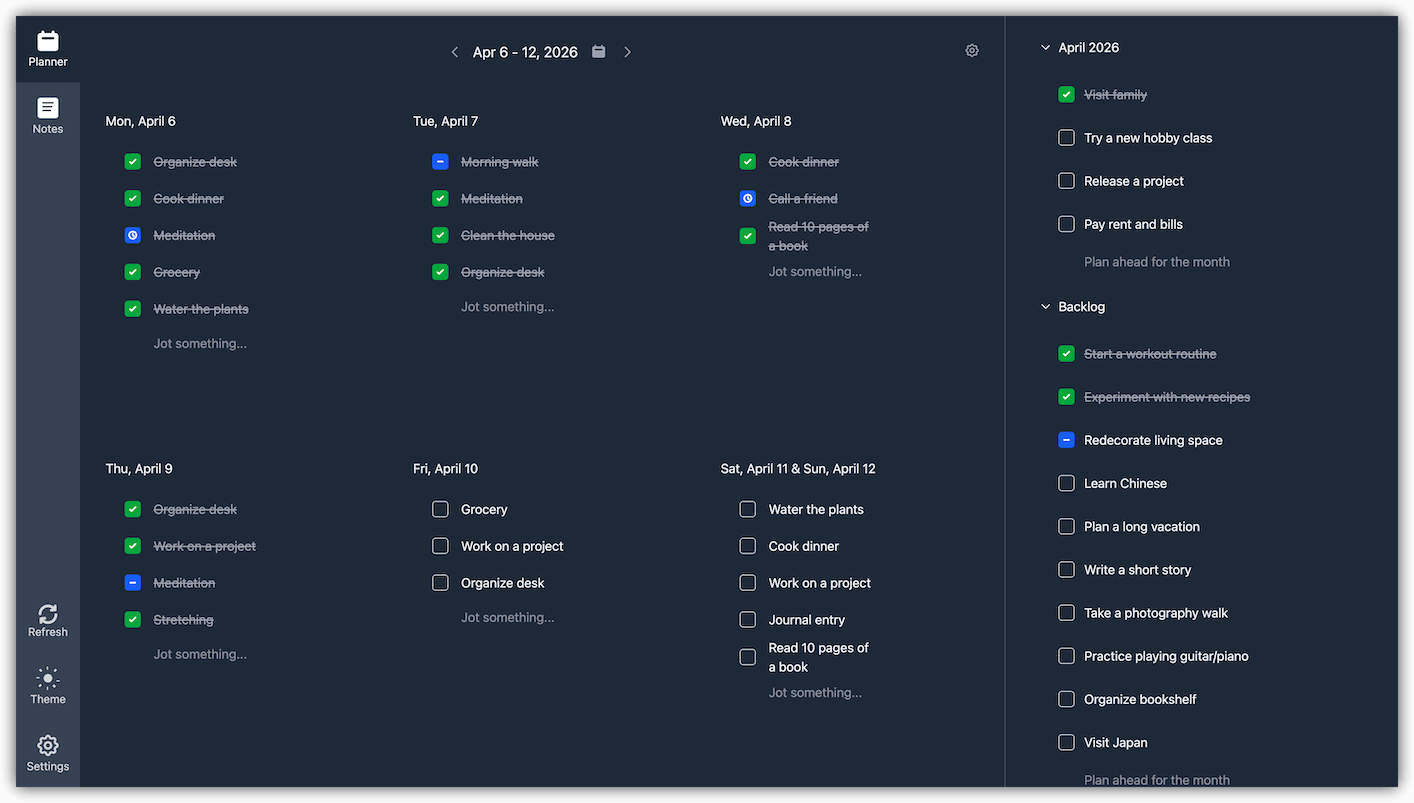
Which should you choose?
Use the smaller tool only when the smaller workflow fits
Choose Perga if…
- your main jobs are personal notes and planning by day;
- you prefer a ready-made workflow to a configurable workspace;
- you want a small interface with fewer decisions;
- you want managed Cloud or the option to self-host.
Choose Notion if…
- you need databases, custom properties, or several views of the same data;
- you collaborate through sharing, comments, permissions, or team workflows;
- you want templates, integrations, automations, or native apps;
- one workspace needs to handle projects, documents, wikis, and more.
Moving simple notes
Import exported notes into a Perga folder
Notion can export ordinary pages as Markdown inside a ZIP archive. In Perga, choose the notes folder where you want the imported content, then upload the export ZIP. Perga imports compatible UTF-8 Markdown, HTML, and plain-text files and recreates their nested folder structure. You can also select multiple compatible files instead of an archive.
This transfers simple note content, not a complete Notion workspace. Perga skips CSV databases and unsupported attachments, and it does not recreate database properties, views, relations, comments, permissions, automations, or planner tasks. Internal links and Notion-specific formatting may not survive, so test a copy of your export first.
Evaluate the workflow
The public demo requires no registration. If the fixed workflow feels right, Perga Cloud starts with a 7-day trial.
Notion is a trademark of Notion Labs, Inc. Perga is not affiliated with or endorsed by Notion.